Turn/Ticket statistics
The statistics section displays turn and ticket statistics combined in a single table.
Displayed information
The tickets or turns shown are only those that are in a closing status, such as completed or canceled.
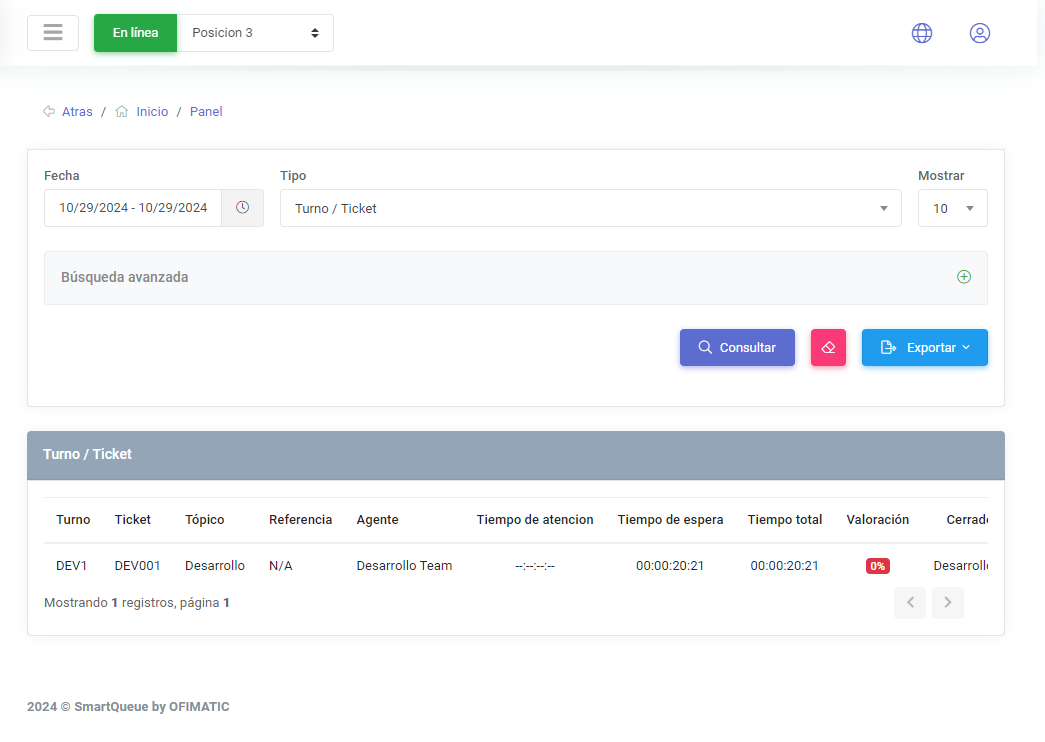
In this section, you can view a search area and select the type of statistic you want to generate.
The table displays the following columns:
| Column | Description |
|---|---|
| Turn | displays the user’s turn code. |
| Ticket | displays the digital ticket code that the agent can view. |
| Topic | displays the topic associated with the ticket. |
| Reference | displays a custom value configured in the integration section. |
| Agent | displays the agent assigned to the ticket. |
| Service time | displays the service time the ticket took to be completed. |
| Waiting time | displays the waiting time the ticket took to be assigned. |
| Total time | displays the sum of waiting time and service time. |
| Rating | displays the rating assigned to the ticket. |
| Closed by | displays who completed the ticket. |
| Start date | displays the date when the ticket started. |
| Closing date | displays the date when the ticket was closed. |
These reports can be exported to CSV, so users can make adjustments or changes to the exported data.